Showing posts with label online money. Show all posts

Thursday, 7 May 2015

Unknown

Share you views


Image result for click here survey
Hi, guyss... I hope you all are enjoying our posts which provide so much of knowledge to you. We are willing to expand ourselves into other domains also. This time we just need a little help from you there is a small survey which you can fill to provide us some of your experiences about online shopping and e-commerce business. Please feel free to share your views in the comment box.


click here to fill the survey. While filling the survey be present with genuine responses.


Take part in our online survey
Read More

Thursday, 15 May 2014

Unknown

How to Boost FIREFOX using SPEEDYFOX

HOW TO INCREASE SPEED
 1. First You Need To Download Speedyfox So Click Here For Download Speedyfox.

2. Now Run It

3. Now Firefox Should Be Closed .


.


4. Now it will run it's process will complete within few seconds and give you sucess Message Like Above  Images in 3rd step.
Read More

Saturday, 12 April 2014

Unknown

Make free Calls and Messeges on internet to any phone

Phone calls are not really free as such yet. For your regular use, a paid subscription is normally required, but there are people whose communication needs are not that bulky and for whom therefore free services work just fine. Now, one way of calling unlimitedly anywhere for free is to use software-based servicesover the Internet and make sure that the callee is using the same service as the caller, a condition which is most of the time inconvenient and sometimes unrealizable. Here are some ways in which you can make calls locally and internationally to any phone, fixed or mobile, worldwide for free.

1. VoxOx

VoxOx aims at unifying all communication channels for users. One main feature is very cheap calling worldwide through their softphone. Upon signing up, you get 2 hours free talking time to any destination in the world. Now this is a lot. If you want to get more talking time, have your friends sign up under your reference, and for each friend, you get another two hours.
Tuitalk allows you to make free calls everyday without ever claiming a dime. Where is the catch? The calls are sponsored by advertising. Before making a call, which basically lasts no more than 10 minutes, you have to watch a 30-second advertising video that loads in the application's softphone itself. And then, you can call people in only 35 countries so far.

3. Vopium

Vopium is a mobile VoIP service that offers cheap international calls through GSM and VoIP, without necessarily having a data plan (GPRS, 3G etc.) or Wi-Fi connection. If you do have any of the latter, you can make free calls to other users using the same networks. Vopium also offers new users 30 minutes free calls and 100 free SMS for trial. You can add up to that by getting friends to sign up under your name.

4. VoIPStunt

When you download and install VoIPStunt's softphone and register, you can make free calls and send free sms messages to any phone for free, provided that the called party is in one of the destinations covered by the service.

5. VoipBuster

Voipbuster is a service similar (or rather identical) to VoIPStunt. I also found out that both services belong to the same company.

6. Jajah

Jajah is a web-based VoIP service that does not depend on softphones to be installed on machines. Everything works through a web interface. Upon signing up, you get the first call free. This can be nothing, but it could be more than nothing in some circumstances.

7. Try No-Phone-Bill Services

There are some device-based VoIP services that eliminate your monthly bills. You pay only once for the acquisition of the hardware and you it afterwards to make unlimited local and long distance calls for free. The most prominent examples are MagicJackooma andPhonegnome. MagicJack is a good bet because the cost of the device is $40, compared to $250 for ooma. Here is a comparison between these services.
Read More

Friday, 28 March 2014

Unknown

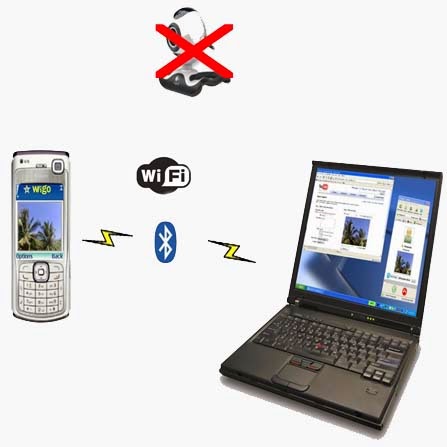
How to use Mobilecamera as a webcam

Dear readers today I am going to tell you How To Use Mobile Camera As A WebCam


Step1:-     Install Windows [EXE] (SmartCam.exe on your PC and Install)

Step2:-     Install Smartcam on your Mobile (Symbian S60 2nd Edition [SIS], S60 2nd Edition, JME [JAR], Windows Mobile [CAB], Android [APK]

Step3:-     Start up SmartCam on your PC and go to >>> File >>> Settings and check your connection and proceed >>> next step.

Step4:-     Start SmartCam on your phone and go to >>> Options >>> Connect and it will ask you for server name and you need to type your PC IP address or your system name


f YOU don't know your IP address then,

>>> go to RUN >>> type CMD >>> type ipconfig
 "OR"
>>> go to Google >>> type "my ip address".
Read More

Friday, 21 March 2014

Unknown

Google Transparency Report: Safe Browsing

Google, giant search engine announced its Online Security Blog with expanding include Safe Browsing statistics in its Transparency Report.

The data is a little short on definition, but it does give some interesting insights into which hosting providers are doing the worst job of keeping their IP space clean.

The new data is based on the Safe Browsing programme, which combines scanning by Google and reports from the wider web world to keep tabs on where the bad stuff is at; browsers use the data to filter search results, to protect their users from potential malware and phishing.


According to the search company's statistics, over the last three months, the AS of Webair Internet Development Inc (36057) has had 3,333 of its sites scanned by Google and 43% of them have been found to be leading to or hosting malware. 
Read More

Friday, 18 October 2013

Unknown

How to make money through Internet

https://m.ak.fbcdn.net/photos-e.ak/hphotos-ak-ash3/c0.69.960.640/s720x720/1234775_507001372715469_559213438_n.png
Read More